Afgelopen weekend was het Pinksteren voor mijn laatste chemo (eigenlijk erna maar door slecht werkend lijf paar keer chemo uitgesteld dus ik zo dan). Dus we zouden weer heerlijk met de kinderen gaan kamperen zoals we bijna elk jaar doen met Hemelvaart of Pinksteren weekend. Vaak ook een mooie vuurdoop weer ff voor de zomer hebben we alles past alles wat vinden de kinderen leuk tegenwoordig. Dit jaar dus camping geboekt in Groningen redelijk simpel wel natuur dachten we en gericht op kinderen alle leeftijden. We begonnen al met niet goed nadenken 🤣🤣🤣 Probleem begon al bij vorige jaren…meestal was alex dan vrij en de kinderen vanaf 12 uur dus op tijd rijden en lekker op tijd opzetten…ja alex was wel vrij maar de kinderen zitten nu op de middelbare school dus er was er 1 om half 1 klaar 1 om kwart voor 2 en 1 om 3 uur oepsie 🤔 voordat je dan op de camping bent is het half 6 en moet alles nog opgezet worden pfff. Dus hadden wij bedacht alex en ik rijden ‘s morgens al op tijd naar de camping we hadden gebeld we mochten kosteloos na 12 uur alvast de camping op dus dan konden wij gaan opzetten, nades zou op tijd weer terug rijden voor haar werk en evt thuis kids begeleiden met hun koffers inpakken en alex zou terug rijden als de vouwwagen en tent stond en dan kon ik intussen op mijn gemak en naar gelang mijn energie en zo alles inrichten. Top bedacht maar zoals altijd bij ons liep dat anders en volledig in de soep 🤪 Vrijdagmorgen eerst mijn vaccinatie dat ging helemaal goed geen enge bijwerkingen hahaha daarna naar huis bakkie koffie en hup alles in de auto laden. Daarna nog ff bakkie en om kwart voor 10 vertrokken we helemaal keurig op tijd. Na ruim een uur richting de Afsluitdijk begonnen de problemen, files afzetting bleek dat er ergens sluizen waren afgezet en de Afsluitdijk ook was afgezet dus we konden mooi weer terug. Maar voor zo’n hele snelweg is omgekeerd en weggeleid ben je ook ff verder dus bij het eerste tankstation gestopt want mijn trut ik dus had heel slim ‘s morgens gewoon haar plaspillen ingenomen dus na anderhalf uur in de auto…pissen as een paard natuurlijk 🙇♀️ Meteen overlegd met nades want inmiddels was het kwart voor 12 wij zeiden ook we moeten hier vandaan nog 2,5 tot 3 uur als we dan aankomen kun jij meteen weer weg dat schiet niet op dus zij is meteen doorgereden naar huis en wij zijn naar de dijk naar Lelystad gereden. File in file uit natuurlijk want dat deed iedereen die eerst de Afsluitdijk over wilde. Nou daarna kwam het volgende drama bij Drachten was een vrachtwagen geschaard dus de hele A7 daar was afgezet en dan moet je door de polder dorpjes amper aangegeven TomTom in de stress pfff een brok ellende wel veel gelachen dat wel. Half 4 ja echt waar na 6 uur rijden waren we eindelijk op de camping pffff en daar begon de volgende ellende natuurlijk het opzetten van een vouwwagen. Normaal geen enkel probleem maar het veld was kleiner dan beloofd, was een en al prut water bagger etc het regende sowieso de hele tijd dus drama. Mijn energie was na een auto rit van 6 uur nul komma nul en mijn tolerantie nivo nog veel lager hahaha ik heb nog nooit zo veel stemmingswisselingen gehad 🤣 van boos naar huilen van agressief naar bekant suïcidaal arme alex want ook die was natuurlijk bekaf en zei alleen maar verkeerde dingen. Uiteindelijk kwamen de overburen helpen hadden dezelfde vouwwagen als wij en toen stond de boel vrij snel. Ik had inmiddels wel al met allex besproken dat ik het niet verantwoord vond dat hij nu nog (inmiddels half 7) nog terugreed naar wormer en met de kinderen weer naar Groningen want dan was hij weer 5 uur aan het rijden dus dat ik op de camping zou slapen en hij in wormer met de kinderen. Ivm zijn ex wilden we de kinderen ook niet alleen laten bij ons dusdanig maar zo niet leuk maar het beste uit 2 kwaden. Zo gezegd zo gedaan…hoe dat ging beschrijf ik in mijn volgende blog…
Author: Alex Sweserijnen
-
Wie ben ik? 🤷♀️
Goedemorgen goedemiddag goedenavond goedenacht ik ben een gezonde gezellige spontane 40+ vrouw die geniet van het leven. Ik kom uit een gewoon gezellig arbeidersgezin met vader moeder broer en zus en ik ben opgegroeid zonder al teveel gekke dingen. Ik ben nu trotse moeder van een dochter van 19 en een zoon van 13, sinds 2 jaar getrouwd met een geweldige man en dankzij hem bonusmoeder van een dochter van 15 en een zoon van 12. Zij zijn om de week bij ons en de helft van de feestdagen en vakanties. Ik ben trots op mijn gezin waarin nooit iets normaal gaat 🤣🤣🤣 ik heb geen standaard gezin gelukkig zeg ik altijd maar want dat zou zo saai zijn. Het is bij ons altijd druk al met alleen mijn kinderen thuis dus laat staan alle kinderen thuis. Alles kan en mag bij ons ook altijd slaapfeestje zoete inval iedereen kan altijd mee eten en de leukste gekke ideeën worden bij ons bedacht en uitgevoerd. Mijn man werkt als it-er nu dus veel thuis en is de spil en de rustige factor in ons huishouden hij houdt ons een beetje met de voeten op de aarde, verder gamed hij graag en vaak dus ook samen met de pubers. Ik zelf heb jaren in de zorg gewerkt eerst huishouding bij ouderen van dagen en dat was super leuk maar ik miste uitdaging dus op een gegeven moment ben ik opleidingen gaan doen voor begeleiding en psychische begeleiding bij mensen thuis. Ook dat met veel plezier gedaan tot ik in 2018 een ongelukje kreeg. Ook dat was weer iets bijzonders hihi we gingen schaatsen en mijn man had nog nooit geschaatst. Alles ging goed tot het eind ik zag een scheur in het ijs over het hoofd en bam daar lag ik 😢 ik wist meteen dit is niet goed zoveel pijn ik dacht ik moet hier weg. Nades wou een ambulance Bellen maar ja middenin de polder dus met behulp van voornamelijk nades naar de kant geschuifeld en toen met de auto naar het ziekenhuis 😌 en inderdaad mijn arm gebroken. Maar niet gewoon gebroken nee de kop van mijn bovenarm is finaal afgebroken en ook nog op 2 plekken ingescheurd. Normaal gesproken wordt je dan geopereerd maar dat kon helaas niet ivm griepgolf onder de artsen dus te weinig personeel. Het moest in een sling en aangroeien. Dat is niet helemaal goed gegaan dus na bijna een jaar modderen en revalidatie moest ik er maar mee leren leven 🤷♀️. Ik durfde alleen geen werk meer in de psychiatrie te gaan doen dus ik ben gaan zoeken naar een kantoor baan ook omdat mijn moeder ziek werd en ik mijn ouders bij wilde staan. Ik vond leuk werk bij Hema klantenservice maar dat was te rustig voor mij hele dag achter de pc is niks voor iemand met mijn drukke karakter hihi. Tijd niet gewerkt omdat ik erg emotioneel was en ook veel met mijn moeder bezig. Plus dat mijn man en ik zouden gaan trouwen dus ook daar druk mee bezig. Helaas mocht mijn moeder mijn bruiloft niet meer meemaken zij overleed eind maart (2019)en begin mei (2019) zijn wij getrouwd maar ik weet zeker dat zij erbij was. In juni ben ik begonnen bij de shell als kassa medewerker en broodjes en koffie medewerker eerst als tijdelijk zodat ik kon kijken wat ik ervan vond en evt naar iets anders uit te kijken maar ik zit er nu twee jaar later nog 🤪 Geweldige baan druk station maar juist daardoor zo super leuk! Ook een geweldig team ook nu in deze tijd steunen ze mij. Nou dat ben ik een beetje in een notendop, mijn hobby’s zijn verder wandelen de natuur (mijn kinderen noemen mij een natuurheks 🧙♀️)en mijn gezin natuurlijk en verder leren jullie mij nog wel kennen als jullie de blogs verder volgen ❤️
-
Mijn tango met kanker
Goedemorgen goedemiddag goedenavond goedenacht de uitleg van de titel is misschien handig heel veel mensen met de diagnose kanker hebben het meteen over dat zij de strijd aangaan met kanker of kanker gaan overwinnen. Mooi streven maar houd dat dan in dat als kanker wint dat de patiënt met kanker “verloren “ heeft? Zo klinkt dat dan toch? 2 jaar geleden heb ik mijn moeder verloren na haar “gevecht “ met/tegen kanker, wij hebben haar verloren na een strijd van anderhalf jaar maar was zij een verliezer? Absoluut niet!!! Ik heb nog nooit een positievere sterkere krachtigere moedigere vrouw gekend als zij. Zij heeft absoluut niet verloren van de kanker zij was sterker dan krachtiger dan de kanker alleen haar lijf niet en daarom zijn wij haar verloren maar zij is zo respectvol overleden dat zij is de winnaar als je daarvan wil spreken. Mede daarom, om dus mensen zoals mijn moeder schoonvader en nog vele met hen de verdiende eer te geven noem ik het geen strijd of gevecht tegen kanker maar een dans waarin ik de ene keer een betere dans laat zien en die rotziekte de andere keer.
Dat is ook mede de reden dat ik nu pas blogs ga schrijven terwijl ik al tegen het einde van de chemo aanloop (dans hihi) maar ik kan gevoelsmatig daar nu pas over schrijven omdat ik nu ervaren ben. Alles in deze blogs zijn dus ook mijn ervaringen gevoelens lichamelijke ongemakken alles ik schrijf dit ook voor mezelf en niet om te discussiëren met iemand anders die het anders ervaart, ook niet om mensen af te zeiken over wel of niet gedane dingen of keuzes. Niemand moet ook iets met mijn blogs ik wil ze gewoon kwijt hahaha je mag ze lezen je mag erop reageren je mag erover praten met mij zonder mij kan allemaal ik zal gevoelens situaties beschrijven om mij heen maar niemand persoonlijk. Ik zei al duidelijk iedereen mag van alles maar niemand moet iets je moet het niet lezen je moet het niet becommentariëren je moet het niet delen bespreken of weet ik veel mag wel moet niet. Ik vraag maar 1 ding wees een beetje lief en respectvol naar de schrijfster en elkaar ❤️
Nu zal ik mezelf voorstellen…misschien ook wel handig hihi 🤣 -
App-V 5.1 misleading conversion warning (Scripts used during conversion included)
During my last project I had the chance to convert about a hundred sequences from App-V 4.6 to App-V 5.1. I started out with a script to test if the sequences could be converted by using the Powershell cmdlet Test-AppvLegacyPackage and export the data to xml and then onto an html file. The html file proved to be a great source for reporting purposes. I am sure that the Powershell code can be a lot cleaner, but it suited my needs for the moment.
Script used to test conversion readiness:
$Source = "[Input Folder]"

$Path = "[Temp Folder]"
If (!(Test-Path $Dest ))
{
New-Item -Path $Dest -type directory -Force
}
else
{
Write-Host "Output Folder already present"
}Get-ChildItem -Path $Source | ForEach-Object {Test-AppvLegacyPackage $_.FullName} | Export-Clixml -Path $Path\Conversion.xml
pause
$a = ""
Import-Clixml -Path $Path\Conversion.xml | sort @{expression="Errors";Descending=$true},@{expression="Warnings";descending=$true} | Select-Object Source, Errors, Warnings, Information | convertto-html -head $a -body "< h 3 >Test-AppvLegacyPackage< / h 3 >" | Out-File $Path\Conversion.html
* remove the spaces before, between and after h and 3 for the correct code.
When I ran this script it generated a warning for two of the sequences reporting:
The icon folder for this package is missing. This package will still convert successfully. However, there will be no icons associated with the applications.
I first checked to see if the icons were in fact missing, but that was not the case. It turned out that the two sequences in question had no valid shortcut entry in the osd file. The osd file just had this entry:
In App-V 4.6 when an osd file is present without a shortcut entry it is still possible to create an application publication in a user environment tool like RESOne Workspace Manager. In App-V 5.1 the same situation will not result in an application publication in RESOne Workspace Manager because no AppV.Shortcut entry is taken into the xml files. So the solution is quite easy. Just paste in a valid shortcut in the osd file for the warning to disappear and to create a valid AppV.Shortcut entry in App-V 5 xml files.
Example to create an Orca shortcut entry in the osd file:
After this change the sequences would no longer generate a warning while tested for conversion readiness and later on were successfully converted and technically tested. Below you will find the script I used to convert the sequences:
$Source = "[Input Folder]"

$Dest = "[Output Folder]"
Get-ChildItem -Path $Source | Test-AppvLegacyPackage | Where-Object {$_.Errors.Count -eq 0 } | Select-Object * , @{n='SourcePath';e={$_.source}} | ConvertFrom-AppvLegacyPackage -DestinationPath $Dest
$Packages = Get-ChildItem -Path $Dest -Filter "*.appv*"
foreach ($Package in $Packages) {
$Name = $Package.Name.substring(0,($Package.Name.length - 5))
$PackageItems = Get-ChildItem -Path $Dest -Filter "$Name*"
New-Item -Path $Dest\$Name -Type Directory
For ($n=0; $n -le $PackageItems.Count -1; $n++) {Move-Item $PackageItems[$n].FullName $Dest\$Name}
}
This basically is the script that Aaron Parker posted on his website a long time ago with the addition of information of another blog post that I found. The addition is needed because in the latest versions the Powershell cmdlet expects other output from the previous cmdlet (SourcePath instead of Source).
-
Making Oracle SQL Developer with external Java JDK work on App-V 5.1
I recently completed a project to convert App-V 4.6 sequences to App-V 5.1 sequences. One of these sequences was Oracle SQL Developer. During technical testing of Oracle SQL Developer I would receive an error stating:
Unable to create an instance of the java virtual machine located at path c:\program files\java\jdk1.7.0_55\jre\bin\client\jvm.dll
At the same time a co-worker had the exact same error at his customer with a converted sequence of Oracle SQL Developer. After a short search on Google I found a blog post that helped me to make the Oracle SQL Developer sequence work on the client. Just remember that not all information might be relevant for your problem, because the co-workers project demanded the Java JDK 1.7.0_55 to be installed and used by Oracle SQL Developer. The steps to get to a solution might therefor be somewhat different.
Steps to fix Oracle SQL Developer on App-V 5.1:
- Start the sequencer with the parameter -EnablePVADControl
- Set the PVAD to C:\sqldeveloper (if you are going to copy the Oracle SQL Developer to that location, otherwise pick the proper location)
- Install the Java JDK to a subfolder of C:\sqldeveloper (or the correct location)
- Copy the source files for the Oracle SQL Developer to C:\sqldeveloper (or the correct location)
- Start the application
- Insert Java JDK path (I installed it to C:\sqldeveloper\Java\jdk1.7.0_55)
- Depending on your way of sequencing (cleaning %AppData% from the sequence or not) you either have to edit the file %AppData%\sqldeveloper\1.0.0.0.0\product.conf during monitoring or in your user environment tool. Change the line AddVMOption -Xmx800m to AddVMOption -Xmx256m. Be sure to edit the correct line because there is also a AddVMOption –Xms128m line present.
- Stop monitoring
- Optionally clean the sequence of unwanted files and registry entries
- Save the sequence
- Test the sequence on the client
A message about an available update might pop up. I must admit that I haven’t put effort yet in finding out how to disable updates in Oracle SQL Developer.
A big thanks goes out to Hosam Kamel for his blog post (http://weblogs.asp.net/hosamkamel/resolving-unable-to-create-an-instance-of-the-java-virtual-machine-error) and the reactions on that blog that pointed me to the proper solution.
I will also let Timothy Mangan know there is one more application to be added to the list of application needing a proper PVAD instead of a dummy. You can find the list of applications needing a PVAD here.
-
Internet Explorer 11 Download Manager will not start when virtualized with AppV 4.6 SP3
A co-worker recently ran into this problem at one of his projects. An Internet Explorer 11 add-on was virtualized using AppV 4.6 SP3 and the add-on uses the Internet Explorer Download Manager to serve up documents from a back-end. On the AppV client however pressing CTRL+J or going to the menu to start Download Manager would not start the Download Manager. The problem could be reproduced by me on my own Windows 7 Enterprise x64 image with AppV 4.6 SP3 client and Internet Explorer 11 installed. I ran some ProcMon and SpyStudio traces, but got word that the customer had opened a case with Microsoft to get a solution for this problem.
Microsoft clearly stated in their response mail that a workaround was needed seeing that AppV 4.6 is in extended support. I will describe the fix supplied by Microsoft below because it turned out to work at another customer that had the same problem.
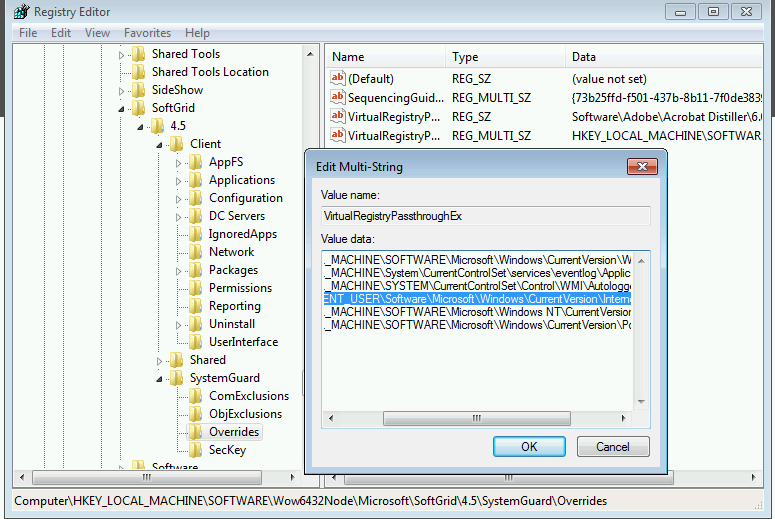
The solution is to remove the Internet Settings entry from the AppV’s VirtualregistryPassthroughEx registry key that can be found at HKEY_LOCAL_MACHINE\SOFTWARE\Microsoft\SoftGrid\4.5\SystemGuard\Overrides or HKEY_LOCAL_MACHINE\SOFTWARE\Wow6432Node\Microsoft\SoftGrid\4.5\SystemGuard\Overrides (x64).
Click image for a graphical representation of the registry key (x64) to remove:
-
Parameter -EnablePVADControl will sometimes not work on a 64-bit machine
Bringing back the PVAD debate for one last time.
Reminder:
These are the three methods of bringing back the PVAD as discussed in several blog posts and the Microsoft TechNet site. Microsoft should fix this page though as they spell Compatibility right once and then spell it as Compatability in the Note.
1. Launch the Sequencer from a command prompt and specify: Sequencer.exe -EnablePVADControl
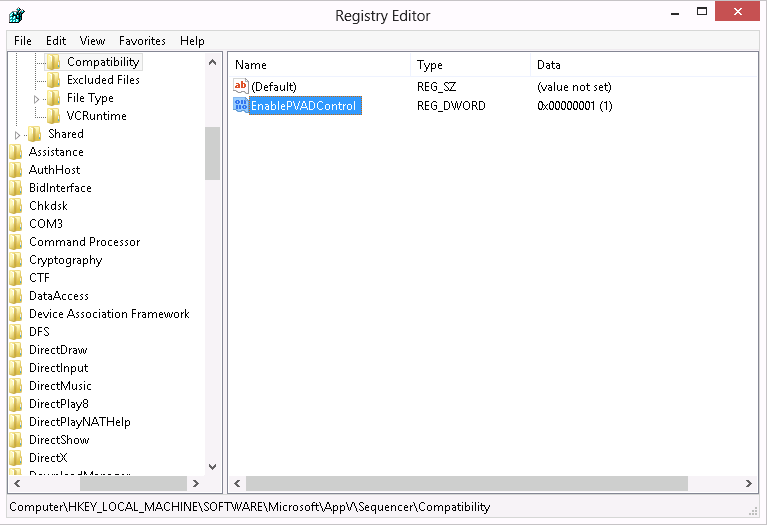
2. Populate a DWORD value called EnablePVADControl in registry here: HKEY_LOCAL_MACHINE\SOFTWARE\Microsoft\AppV\Sequencer\Compatibility. Setting the value to 1 will enable the PVAD field next time you launch the Sequencer and 0 will turn it back off.

3. Use the command line sequencer and specify the -PrimaryVirtualApplicationDirectory argument against New-AppvSequencerPackage.
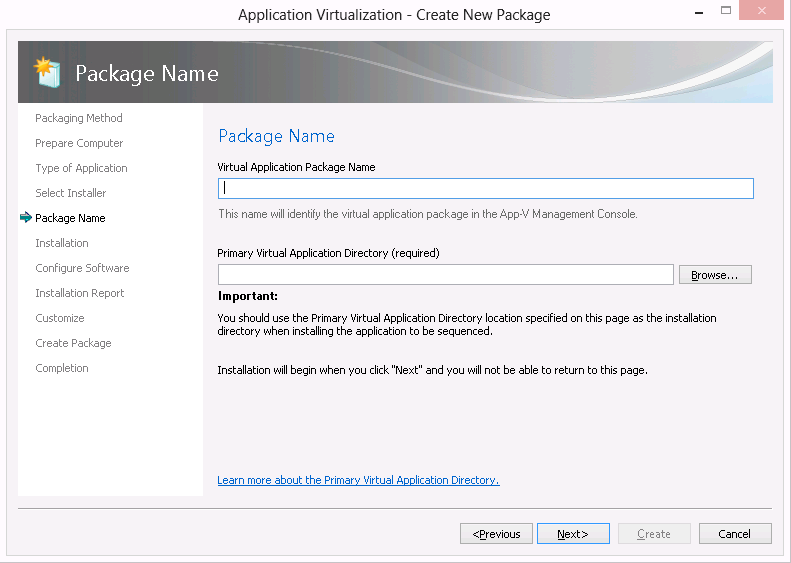
Result should be that in the Sequencer you can specify the PVAD again. See below:

We just noticed that in AppV 5.0 SP3 the -EnablePVADControl parameter only works on a 32-bit machine. On a 64-bit machine the parameter is not picked up. However the registry setting mentioned earlier is picked up.
Conclusion:
If you want the PVAD option back and you are working on a 64-bit machine be sure to use the registry key and not the -EnablePVADControl parameter.
Update:
It has been pointed out to me this is not the default behaviour. I have tested this against two 64-bit machines and two 32-bit machines. I will test some more and hope to find the cause why the parameter is sometimes ignored. Conclusion is still valid though as the registry key always works.
-
Sequencing and Publishing MProof Clientele ITSM
This is a fast recipe to sequence and publish MProof’s Clientele ITSM in conjunction with App-V. The reason to blog about it is that the application popped up at several of my projects. At my last project the solution to get Clientele ITSM to work with App-V was unknown. So here goes.
The installation is a simple drag an drop folder action into the %ProgramFiles(x86)% folder and the creation of a shortcut that points to the main executable Clientele.Loader.exe. There is however one small thing to know about this application. Use the command line parameter -nodownload in conjunction with Microsoft App-V, otherwise you will end up with an application that will try to download the complete application from the server backend at runtime. This is because the server backend will check the last modified time stamp of the files and these time stamps will be altered when the application is published through the App-V client. The parameter -nodownload disables the timestamp check.
The initial Clientele.Loader executable points to a second executable. Either Clientele.Loaderx86.exe or Clientele.Loaderx64.exe will (depending on the bitness of the client) will be started through the initial executable. So if you are publishing the application with RES Workspace Manager it is necessary to authorize both executables (Authorized Files mechanism).
Finally, the application will save user settings in a file called user.config somewhere in the local application data portion of the user profile (AppData\Local). After sequencing save this file and distribute it through the RES Workspace Manager zero profiling mechanism.
If you are already using RES Workspace Manager it is also possible to sequence the applictaion without adding the command line parameter, so you can add the command line parameter is RES Workspace Manager.
-
AppV 5.0 SP3 and the “hidden” PVAD
I just downloaded the bits and bytes for the AppV 5.0 SP3 and started to play around with the PVAD that is now “hidden”. This is because a Merged roots principle was introduced.
First let me take you back to version 4.x of AppV. One thing I didn’t like about AppV 4.6 and using a long file name for the asset folder is the fact that a random short file name was created for the sequence
Example would be:
A sequence with the long file name Adobe_Reader_XI_NL_B01 could have a generated short name of F3WJDL8N.X1W (or any other randomly chosen name that contains alpha-numerical characters).
The chance of two randomly generated short names being identical were almost non-existant but there was a small chance. That last part is what I didn’t like about it. If you used a name within the 8.3 format for the long file name the result would be that the short file name would automatically be the same as the long file name. So that meant more control over possible conflicts or even removing the chance of conflicts.
In AppV 5.0 SP3 the same principle is re-introduced. The option to declare a PVAD is not available any more. It can be brought back by changing a registry key or starting the sequencer with the -EnablePVADControl parameter. More on this can be found in the write-up of Tim Mangan of AppV 5.0 SP3 which you can find here.
The screen that you see just before you start monitoring now looks like this (I hope you don’t mind the dutch GUI):
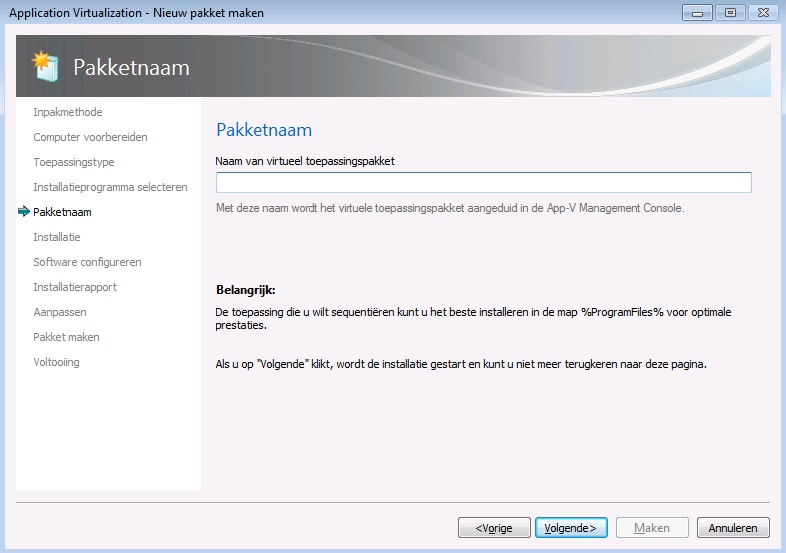
In AppV 5.0 SP3 you can only name the sequence and the description now reads that on the AppV Management Server this is the displayed name of the sequence. As you can see by default there is no PVAD option availbale. Also in the bottom part of the screen you get the recommendation to install the application to %ProgramFiles%.
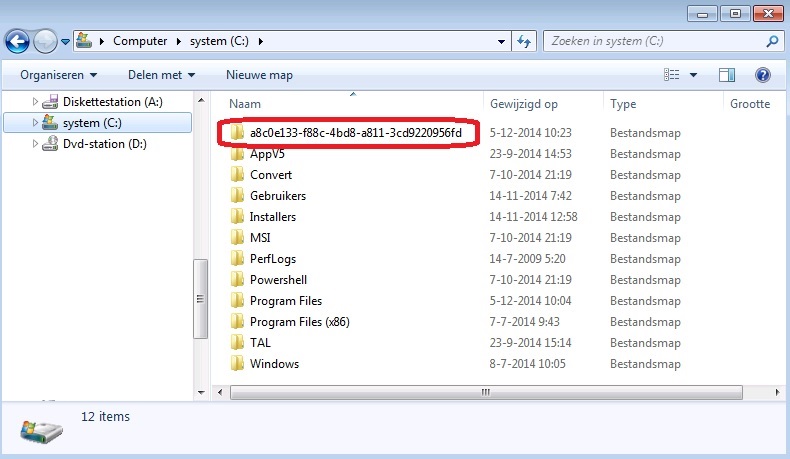
What the sequencer does next is create a folder with a random GUID as name in the root of C:\. You can see that in the picture below:
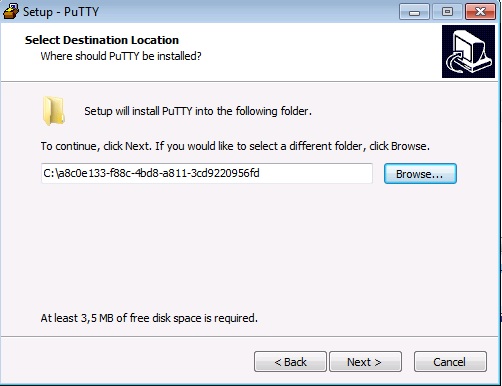
When installing the application to the default location (usually %ProgramFiles%) all files will be placed in the virtual file system. Now you automatically install to a dummy PVAD by default. It is however still possible to install to the AppVPackageRoot by selecting the automatically created folder as the installation folder. You might need this for a few application that can’t handle being installed to the virtual file system (WinZip is one of those application). Some other examples of these application can also be found in the write-up of TimMangan that I mentioned earlier.
See below for installing an application (Putty still remains a good test application) to the folder with the randomly generated GUID:
And the result in the sequencer:
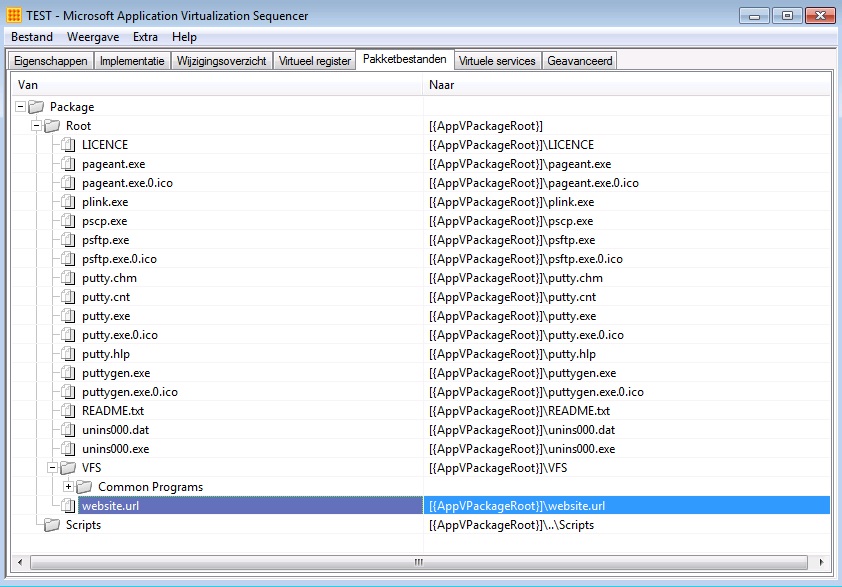
As you can see you the files still end up in the AppVPackageRoot.
So AppV 5.0 SP3 uses a “hidden” PVAD which you can still bypass rather easily. It also removes the option to set an UNC path as dummy PVAD which I wrote about here. At least if you don’t use the -EnablePVADControl parameter or the registry change.
-
Don’t use an UNC path as a dummy PVAD in AppV 5.x
From the beta from AppV 5.x onwards I always used a dummy folder as Primary Virtual Application Directory (PVAD from now on). By doing this I always ensured that all files ended up in the virtual file system. I want all files to end up in the virtual file system because only virtual file systems and virtual registries are able to “see” each other when two sequences are connected through an AppV 5.x Connection Group. Since the release of Hotfix 4 for AppV 5.0 SP2 the introduced option to have full write access in the virtual file system is an added reason to always install to a dummy folder as PVAD. Even Microsoft (in the person of Steve Thomas) have changed their stance about a best pratice for installing to the PVAD. Microsoft now recommends not to install to the PVAD. You can read about it here.
During one of my AppV 5.x Basic classes we were working with a network share to save our sequences to. One of the students decided to skip some steps and used the folder on the network share as the dummy folder to be used as the PVAD. This results in a sequence that will not start on the computer with the AppV client installed. Below I will show the artifacts on the client and the troubleshooting methods used to detect the cause.
The published shortcut doesn’t have a valid command line:
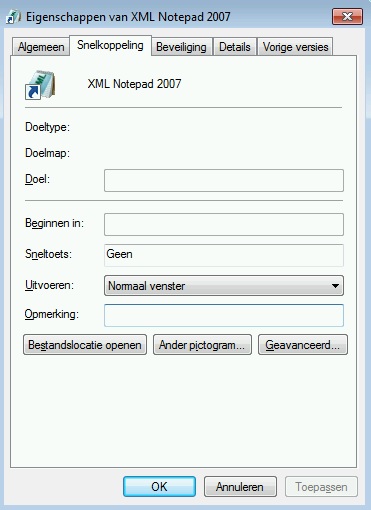
This either results in the application not starting (no error) or an AppV error depending on the application that is being virtualized. The student saw strange AppV errors that pointed him in questioning if the proper version of the AppV client was installed. Seeing that I had done the classroom setup and knew for sure that both AppV 5.0 SP2 HF4 Client and Sequencer were installed (I even double checked that before starting the course) we quickly ruled that out as a cause. I reproduced the issue with the application XML Notepad 2007 and that application wouldn’t start. So I went from there.
Next I checked the AppxManifest.xml file in the C:\Programdata\[PackageID]\[VersionID] folder to see the properties of the published shortcut.
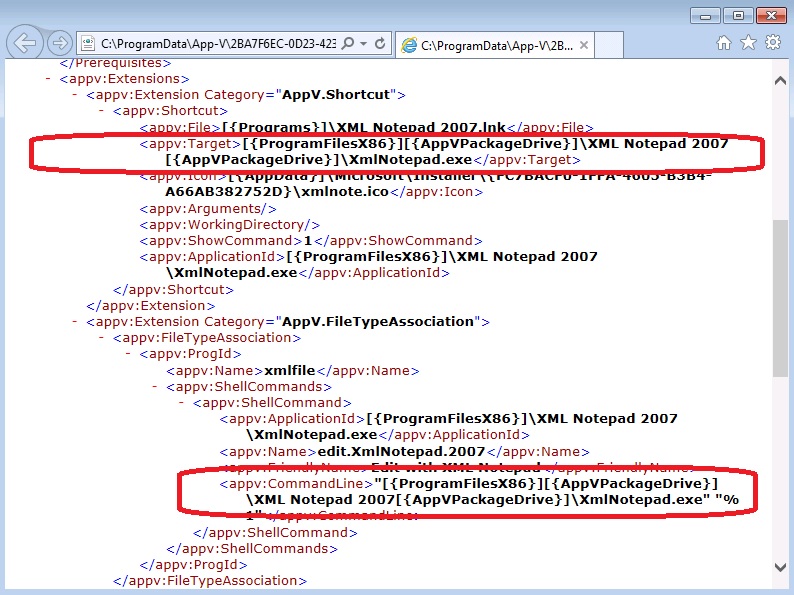
The path at appv:Target lists the [{PackageDrive}] token twice. This results in an invalid target path for the published short and therefor no path is shown in the shortcut.
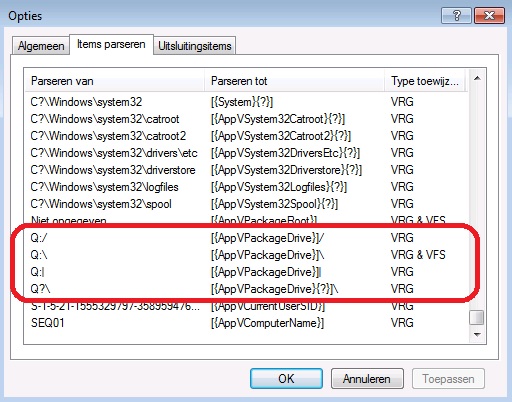
Next I went to the sequencer to list the parser items just to see where the [{PackageDrive}] token is pointing to. As expected it is pointing to the Q:\ drive used in AppV 4.x. So the shortcut is basically pointing to C:\Program Files (x86)Q:\XML Notepad 2007Q:\XmlNotepad.exe. That doesn’t look right.
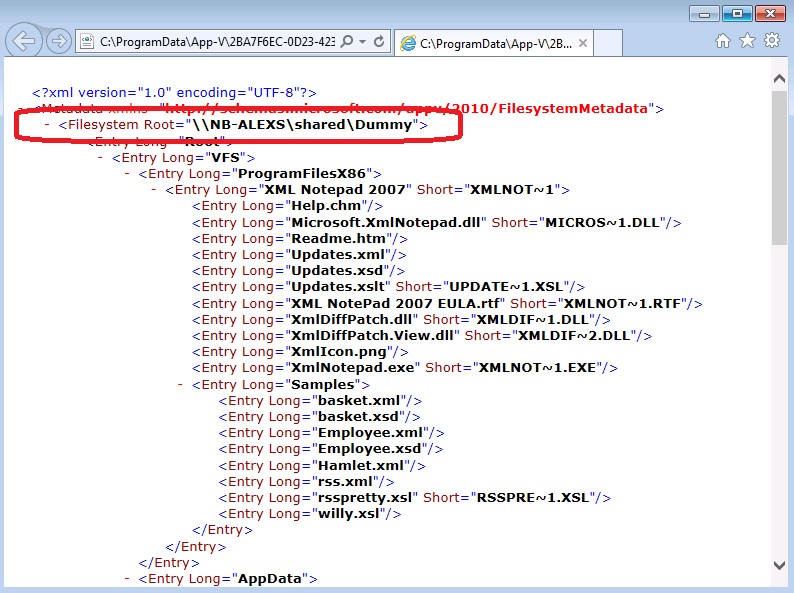
By now I already suspected a faulty PVAD or something similar. So I went back to the client and checked the FilesystemMetadata.xml file in the C:\Programdata\[PackageID]\[VersionID] folder.
As you can see the Filesystem Root entry (other notation for PVAD) lists an UNC path instead of a local path. This causes all kinds of paths to be populated by several [{PackageDrive}] tokens and in the process creating invalid paths.
I did one more check on the sequencer to see more artifacts. I didn’t clean the sequence so all Windows Installer related files and registry keys were still in the sequence. I browsed to REGISTRY\MACHINE\SOFTWARE\Windows\CurrentVersion\Installer\Folders.
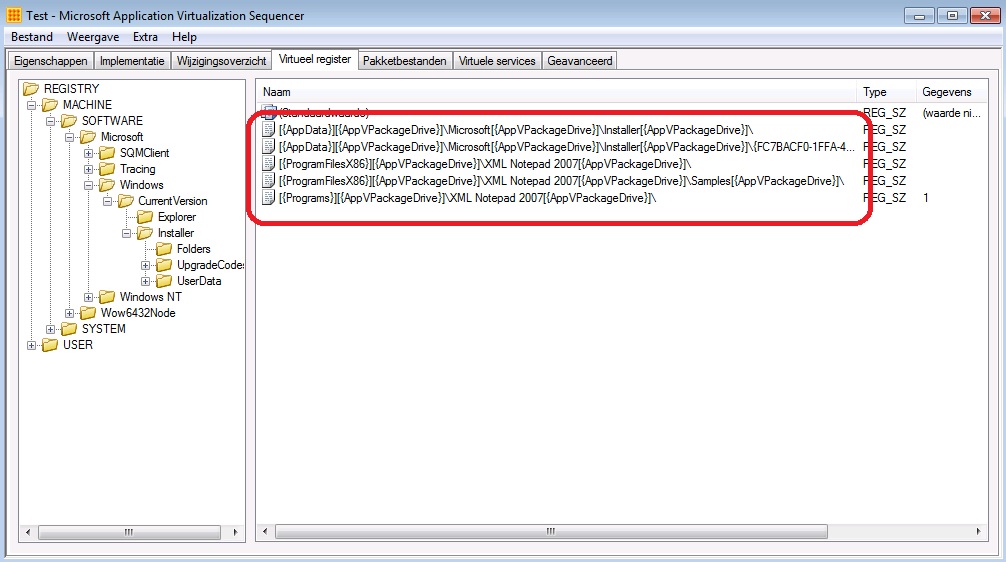
Even the Windows Installer registry keys are mangled because they contain multiple [{PackageDrive}] tokens. In my opinion the best way to fix this is to re-sequence the application and to use a folder on the local disk as a dummy PVAD
So my advice is: Don’t use a folder on an UNC path as a dummy PVAD, use a folder on local disk instead.